Works with the tools you already pay for · no per-integration fees
 QuickBooks
 Motive




 Gmail
Gmail Outlook
From the rate con to the Friday pay run, Truxello runs your whole operation: AI-parsed loads, live GPS, invoices sent from your own inbox, and driver settlements you can check line by line before you pay.
Watch the full demo (26 min)Works with the tools you already pay for · no per-integration fees
QuickBooksMotiveGmailOutlookOne load from start to finish: set up the company, book and dispatch the load, follow the driver, invoice the broker, pay the driver, and file IFTA.
The web portal your office runs on and the app your drivers carry, shown here with a sample fleet.
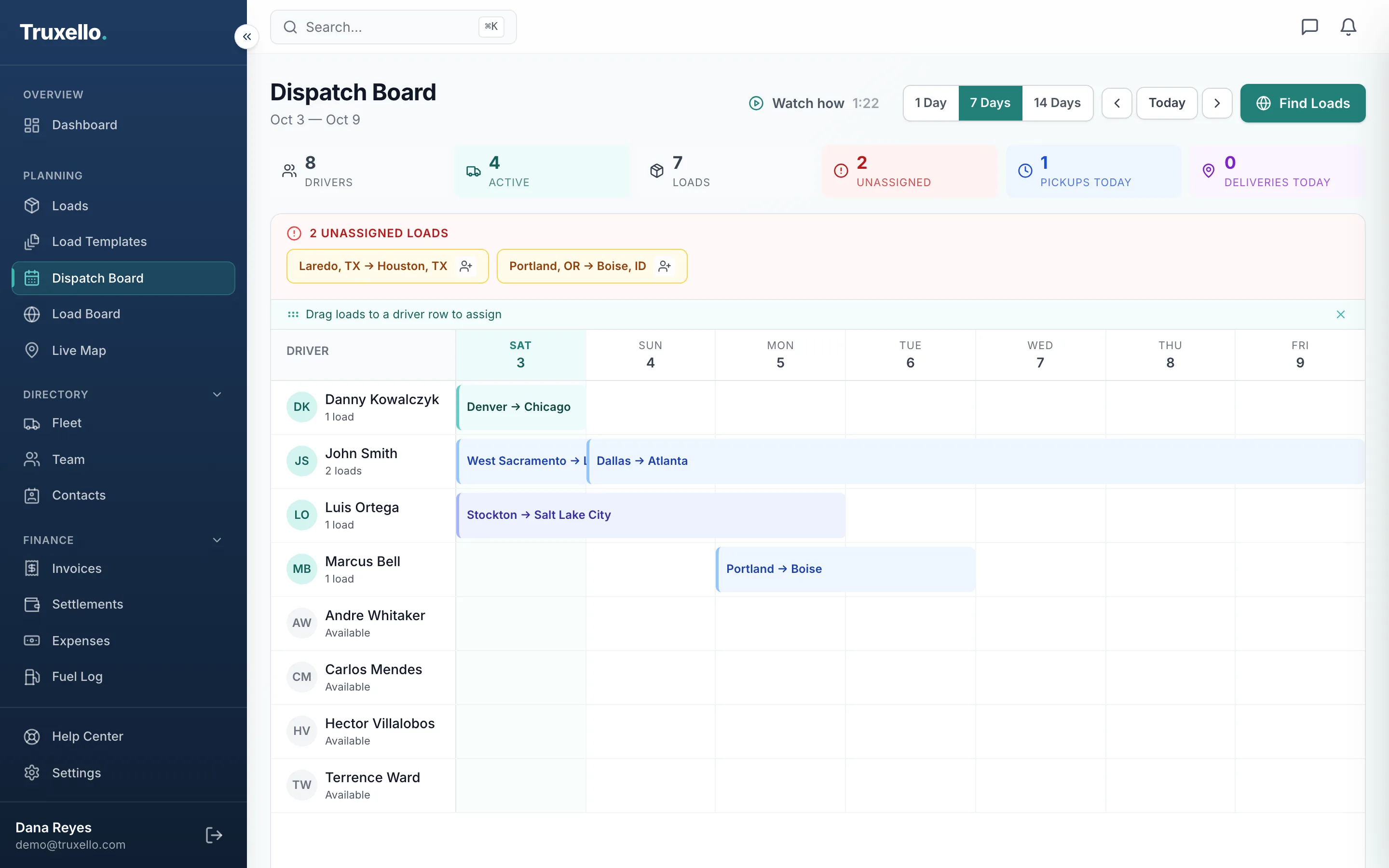
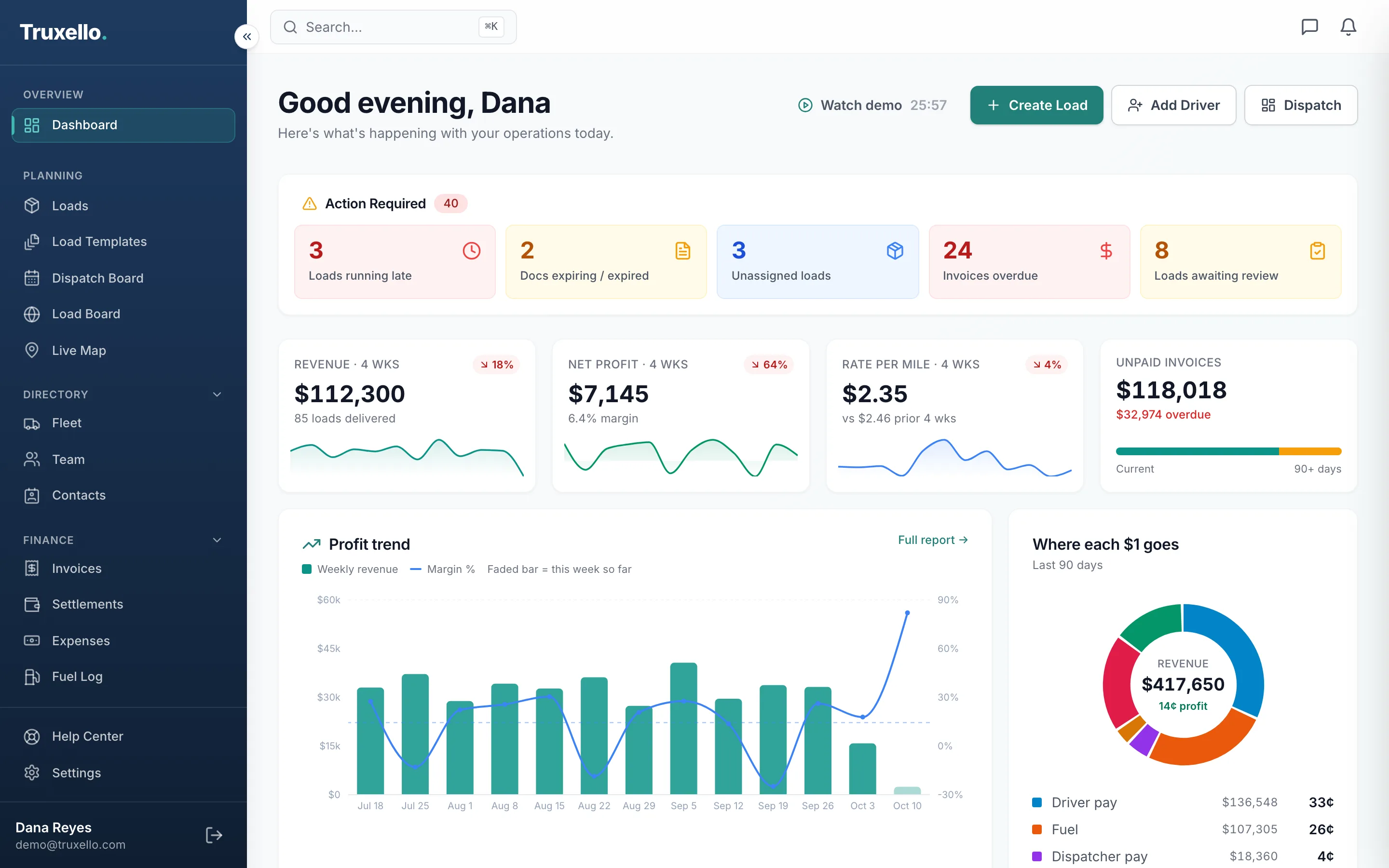
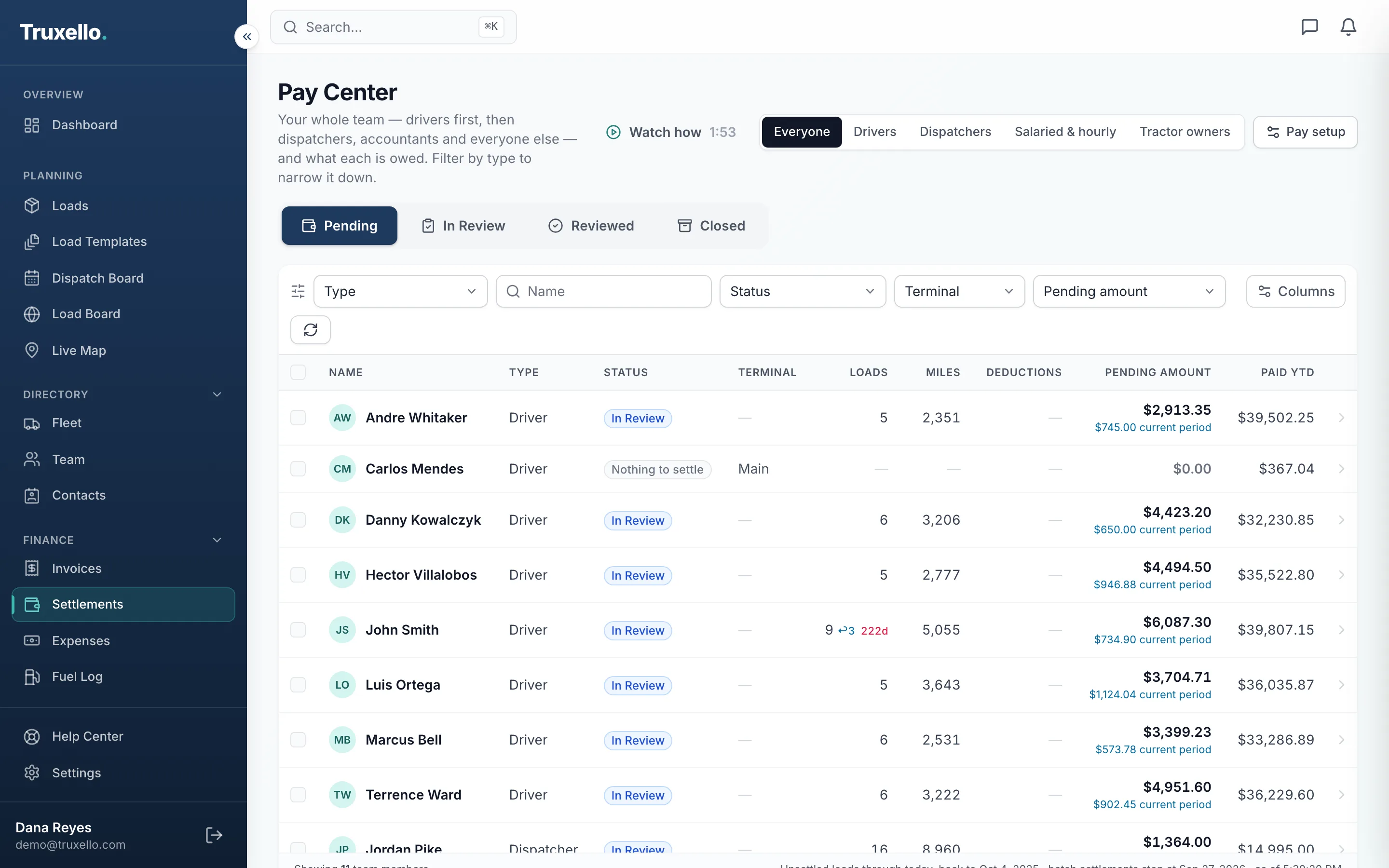
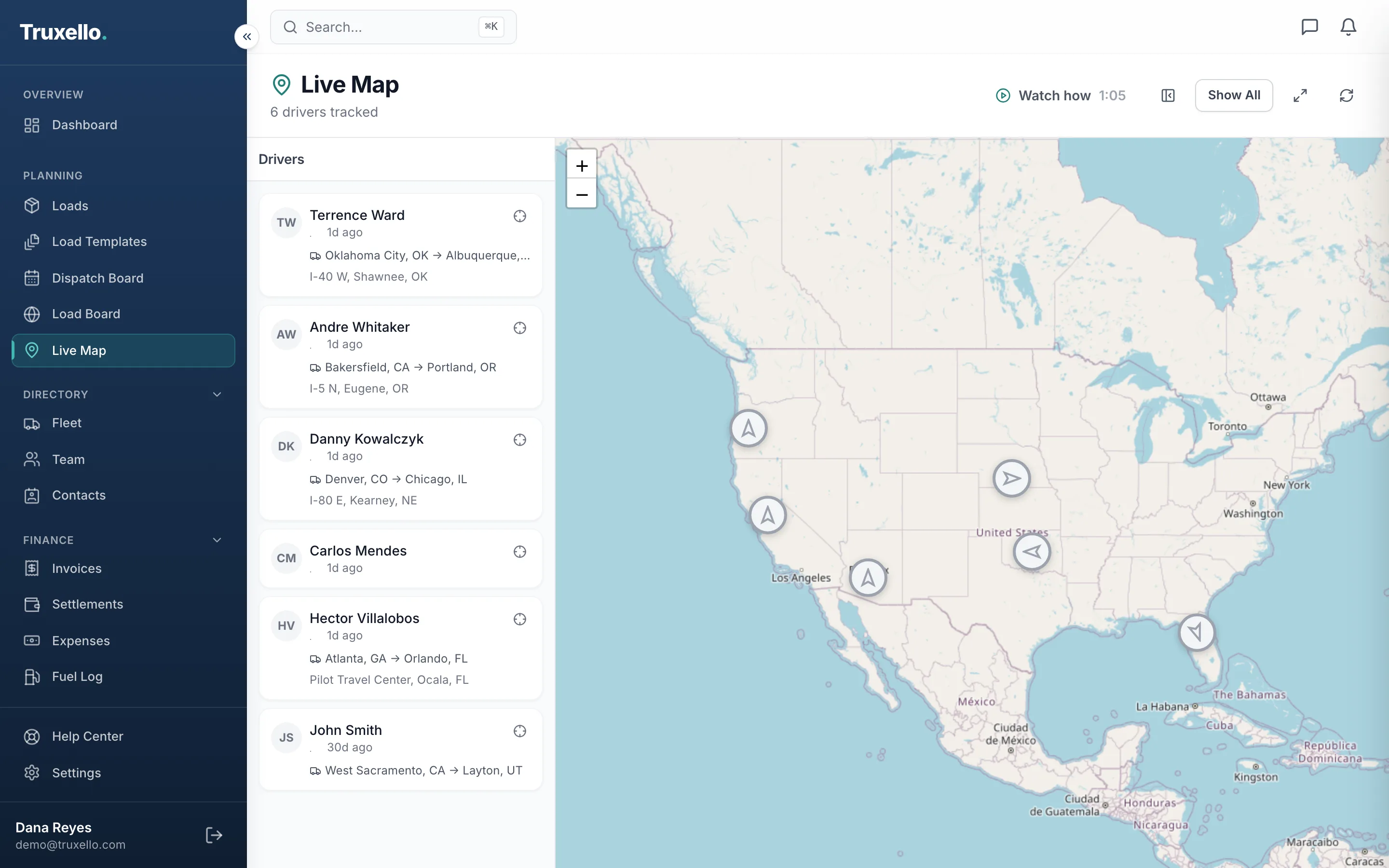
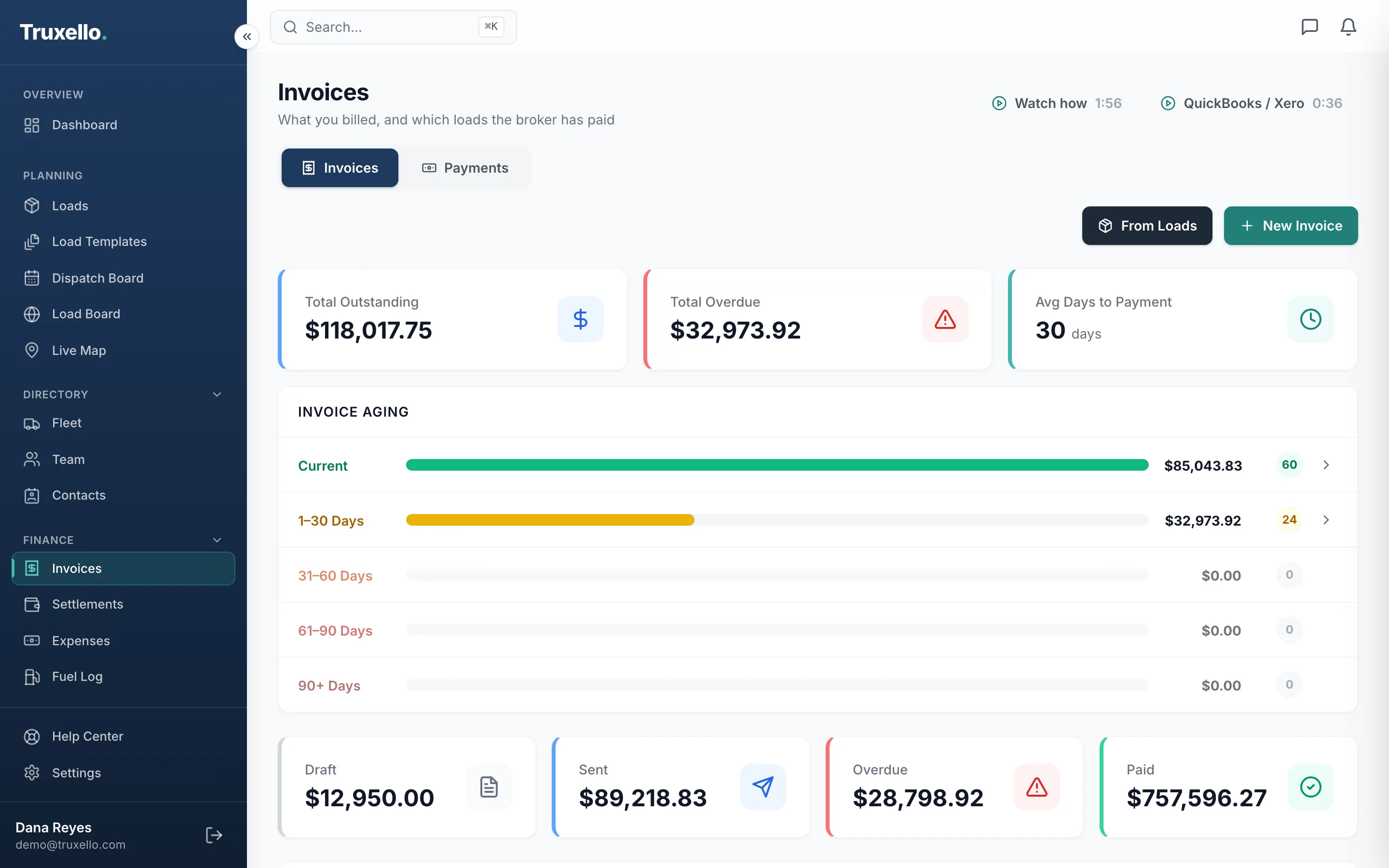
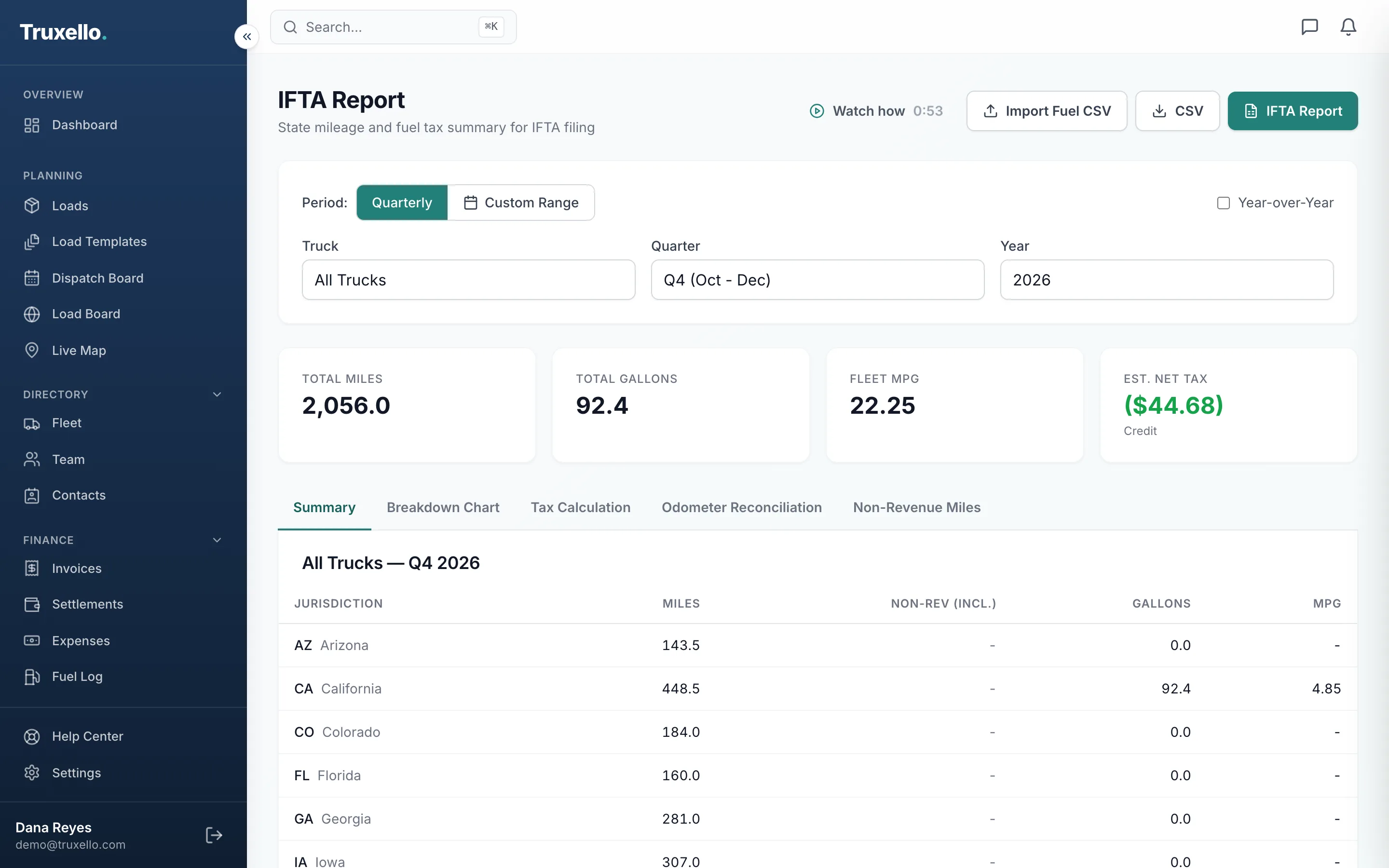
See every driver’s week at a glance. Drag an unassigned load onto a driver to dispatch it.
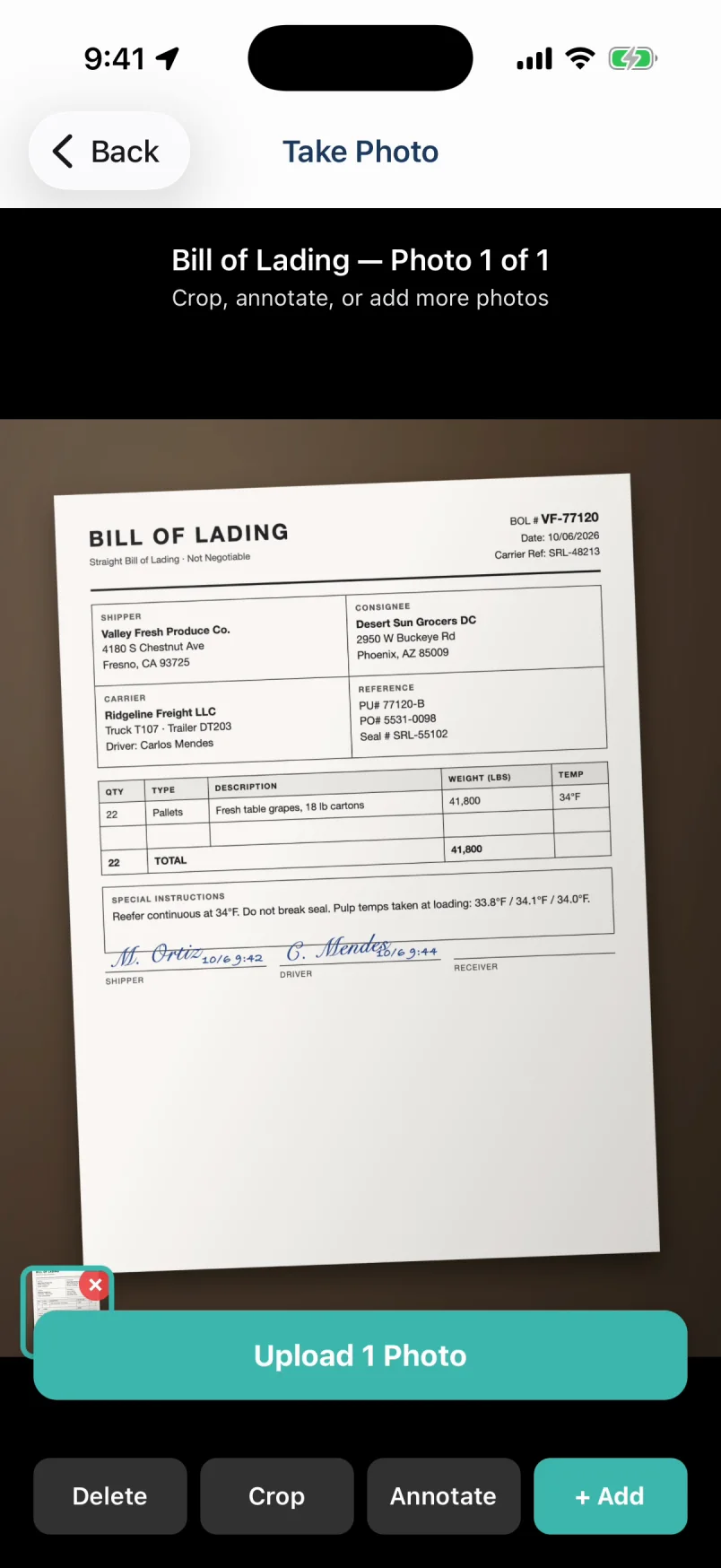
Loads, stops, paperwork and fuel, on iPhone and Android. A status change on the road is on the dispatch board as soon as it happens.
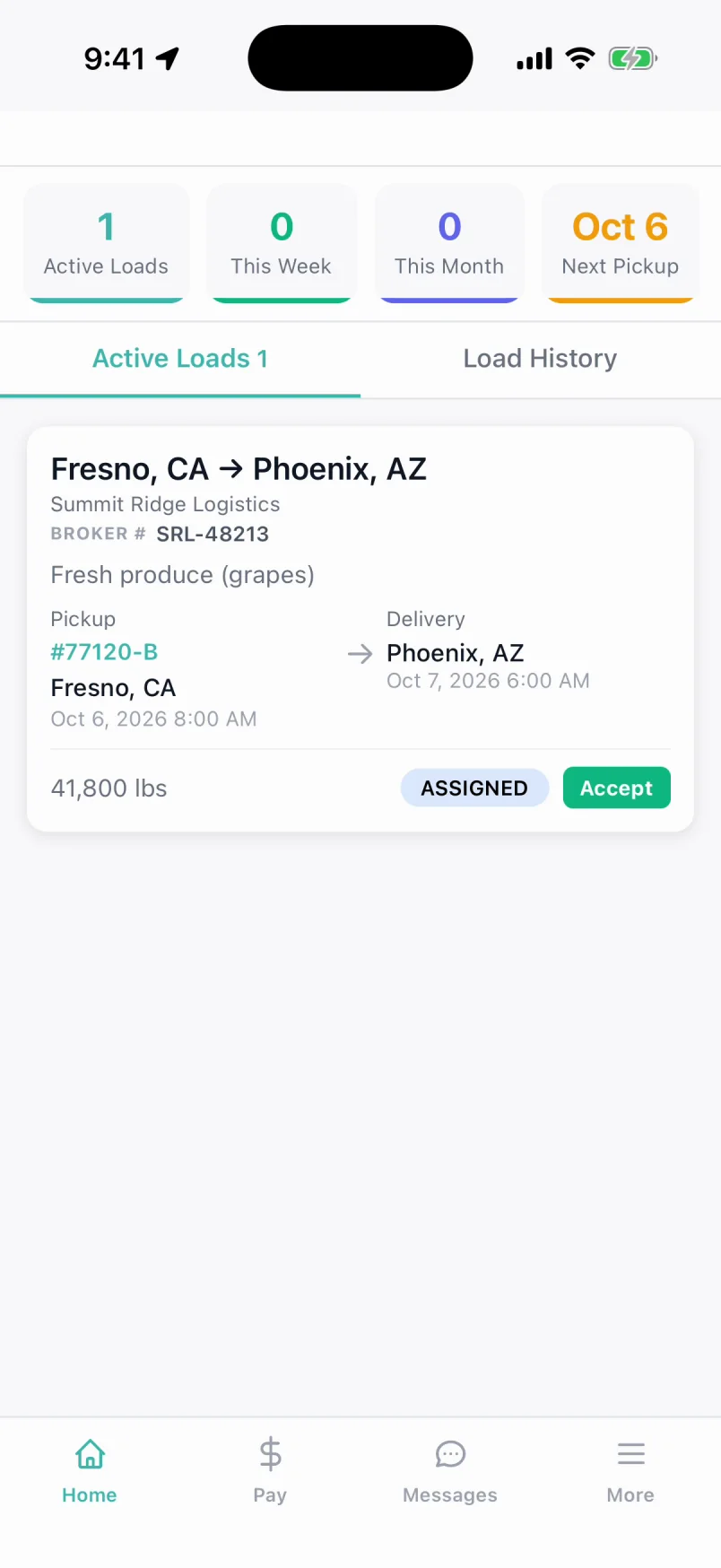
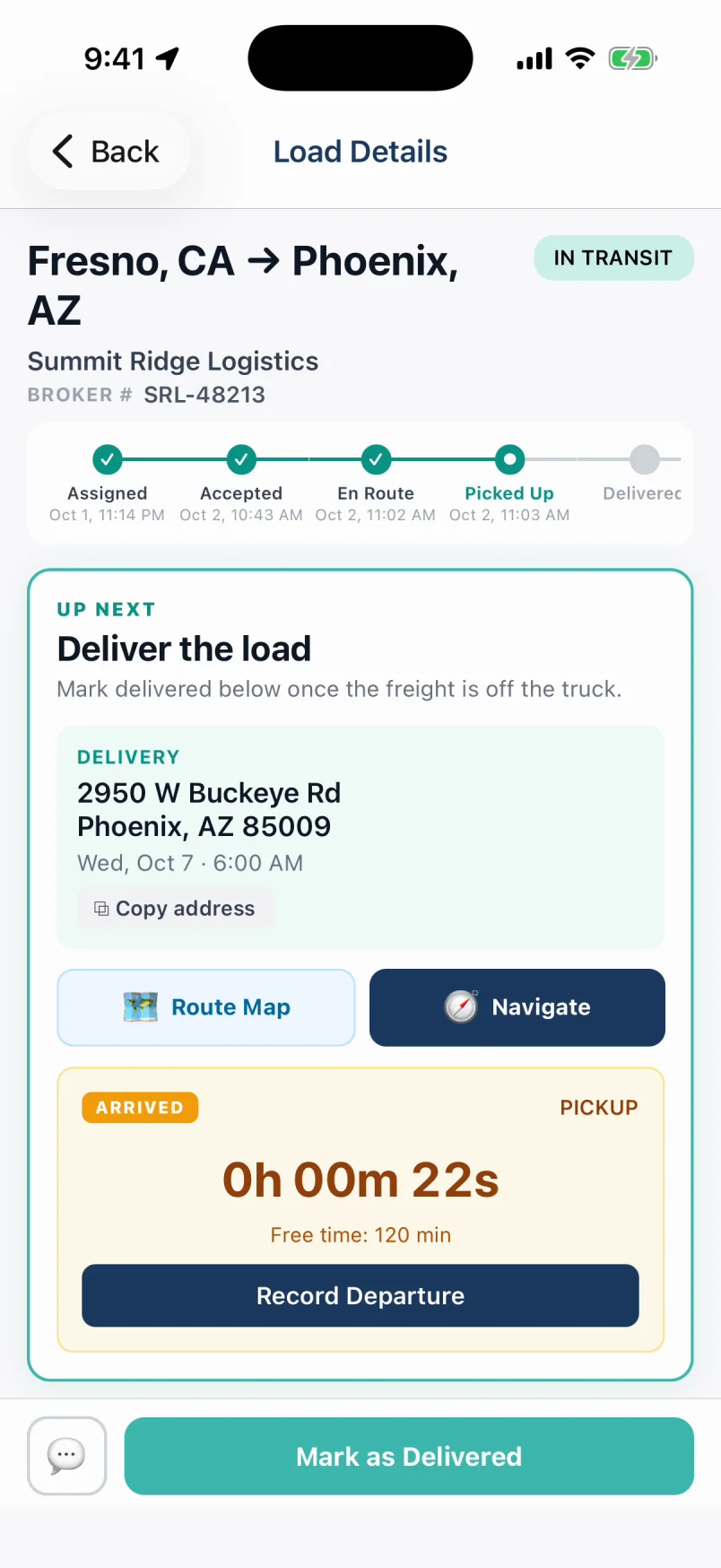
Most TMS software takes weeks to set up and a sales call to price. Truxello is self-serve, every plan has every feature, and you can dispatch your first load today.
Sign up, add a driver, upload a rate con, and dispatch. No implementation project and no training week.
When a driver updates a stop, the office sees it. Same load, both screens, no check-call.
The iPhone and Android app is included. Drivers download it free from the App Store or Google Play.
Each person gets a role. A mechanic sees equipment. Settlements stay with the people who pay.
Company drivers, owner-operators, tractor owners, dispatchers, and office staff, each paid the way your deal with them really works. Truxello builds the statement from the loads, the fuel card, and the recurring charges, and you check it line by line before a dollar moves.
Settle a tractor, not just whoever drove it this week. Loaded and empty miles, the owner’s share, and their deductions on one statement.
Salaries quoted weekly, monthly, or yearly, and dispatcher commission on the loads they booked, all in the same Pay Center.
The layout drivers already know: your company on the letterhead, pay components on every load, and year-to-date gross and net that show their arithmetic.
Both see the same load the moment it changes.
Rate con parsing, a dispatch board, live GPS, Truckstop, QuickBooks, ELD, IFTA and driver pay. Every plan gets all of it.
Upload a rate confirmation and let AI auto-fill your load details. Extracts broker, addresses, dates, rates, and commodity in seconds, so nobody retypes the PDF.
Plan the week on a visual dispatch board, then work loads as cards, a calendar, or a filterable list. Filter by driver, customer, reference number, or payment status, and bookmark the view.
Every truck on a live map with an ETA for each stop. Loads flag themselves when a pickup or delivery runs late, a BOL is missing, or a delivered load still hasn’t been invoiced.
Search Truckstop directly from Truxello. Compare rates, view market intelligence, and import loads with one click. No second tab, no retyping.
Invoices, customers, and expenses flow into QuickBooks Online. When a broker pays in QuickBooks, the invoice comes back marked paid in Truxello.
Bill a load in one click. The invoice, rate con, and POD merge into one PDF packet and go out from your own Gmail or Outlook, with the load and reference numbers the broker matches against.
See all features by category
Create, assign, and track loads from pending to delivered. Multi-stop, team drivers, and relay loads, rated flat, per loaded mile, per hundredweight, or per ton.
Run the same lane every week? Save it as a template and generate the week’s loads in one go instead of retyping them.
Fuel surcharge by the mile, stop-offs by the stop, detention by the hour. Quantity times rate on the load, the invoice, and the driver’s pay.
Save shippers and receivers as you enter a load, so a lane is typed once. Every stop after that is a pick from the list.
Routes calculated for every multi-stop load, with loaded and empty miles and state-by-state mileage ready for IFTA.
Chat with drivers linked to the load, and keep every BOL, rate con, and POD on the load it belongs to, uploaded from the road.
Drivers, dispatchers, office staff, and mechanics in one place. The first form captures the full driver profile: license, terminal, emergency contact, and opening year-to-date pay.
Everyone joins with a one-time invite link and sets their own password. Roles decide what each person reaches. A mechanic sees equipment and nothing else.
Every truck and trailer on one board: unit number, VIN, status, assigned driver, and documents. A retired unit keeps its number and history.
Log service and repairs against each unit, see what’s coming due, and keep the records a DOT audit asks for.
Push a weather warning, a road closure, or a policy change to every driver’s phone at once, from a template or written fresh.
Pair drivers with the tractor they run, so loads, fuel, and settlements follow the right truck without re-picking it every time.
Company drivers, owner-operators, tractor owners, dispatchers, and office staff, settled in four stages on the pay periods you set. See how it works.
Invoice from the load with the broker’s billing address filled in. Track what’s paid, part-paid, and paid late right on the load row.
Mark which loads went to your factor and see the fee taken on each, filtered by driver or status, and export it for your books.
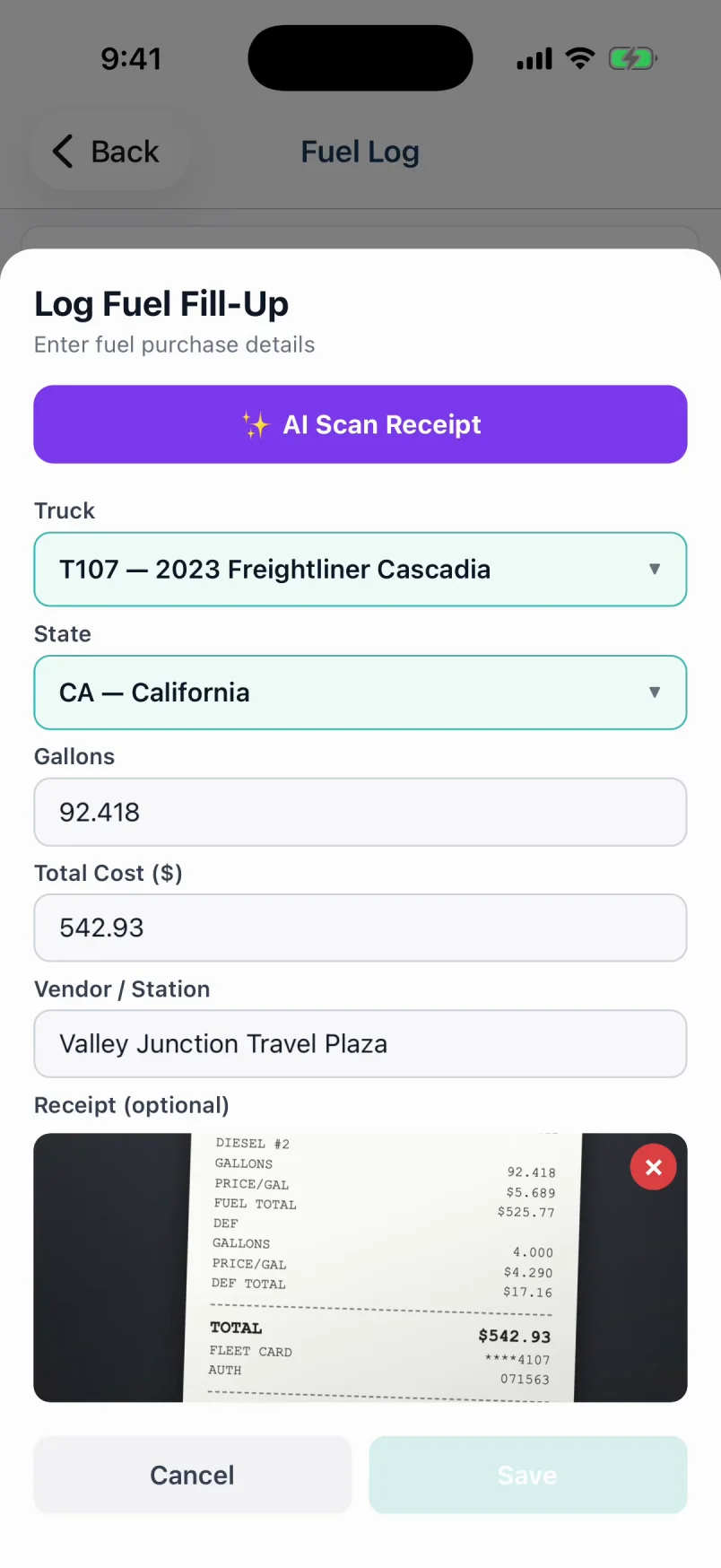
Import EFS, WEX, and Comdata transactions, or let drivers snap receipts in the app. Fuel reconciles onto the settlement and feeds IFTA.
State-by-state miles from your routes and gallons from your fuel log, rolled into a quarterly IFTA report you can export.
Tolls, repairs, permits, and everything else, with receipts attached and tagged to a truck, trailer, or driver, or passed through to a settlement.
Medical cards, licenses, registrations, and insurance tracked with expiry dates, and daily checks that warn you before anything lapses.
Connect Samsara, Motive, or Geotab to see Hours of Service, vehicle diagnostics, and DVIRs next to the loads they belong to.
On-time delivery, safety score, and fuel efficiency per driver, so coaching conversations start from numbers, not impressions.
Revenue, profit, and fleet status at a glance, plus a basic report, trend analysis, and profit & loss when you want to dig in.
Brokers, shippers, and receivers with their billing addresses and contacts, and the history of every load you’ve run with them.
Share a live tracking link with brokers and shippers. They see real-time load status, driver location, and delivery timeline without logging in.
No packages and no tiers to outgrow. You pay for the trucks you run, and the price per truck drops as your fleet grows. Comparable platforms charge $290+/month for the same features.
Pay annually and get 2 months free.
Averages $17.80 per truck
Includes up to 10 drivers
Start Free Trial14 days free, no card required. Cancel anytime.
We count the active trucks in your account. Add one and it shows up on your bill automatically; there is no plan to upgrade.
You only pay for the days left in your billing period, at that truck's rate. A 6th truck costs $15/month, not a new package.
Deactivate it in Truxello. A truck that already hauled a load this period stays on that bill, and your price drops from the next period.
Each truck covers 2 drivers, so team drivers cost nothing extra. With more than 2 drivers per truck, you're billed for one truck per 2 drivers instead.
Enterprise plans add custom onboarding and integrations on top of every feature.
No setup fees. No onboarding calls. Just sign up and start dispatching.
Sign up with your email. No card. A setup wizard walks you through the rest, and you can book a live walkthrough from inside it.
Send drivers and dispatchers an invite link. They set their own password and drivers get the app. Add trucks, trailers, and each driver’s pay terms.
Drop in a rate con and AI fills the load. Assign it, watch it move on the map, and drivers update status and upload BOLs from the app.
Invoice brokers from your own inbox, run the weekly pay run, sync to QuickBooks, and pull your IFTA report without leaving Truxello.
Stop paying $200+/month for bloated enterprise software or juggling spreadsheets. Truxello gives you everything in one place.
| What You Need | Spreadsheets & Phone Calls | Enterprise TMS ($200+/mo) | Truxello |
|---|---|---|---|
| Dispatch Board | Manual whiteboard | Yes | Visual, drag-and-drop |
| Driver Mobile App | Phone calls & texts | Extra cost add-on | Included, iOS & Android |
| AI Rate Con Parsing | Manual data entry | Not available | Upload the PDF, load fills itself |
| Real-Time GPS Tracking | Call driver for updates | Yes | Live map with ETAs |
| Driver & Owner-Operator Settlements | Spreadsheet formulas | Often a separate module | Included: pay terms, deductions, pay periods |
| Invoicing | Word templates & email | Yes | One click, sent from your own Gmail or Outlook |
| Fuel Cards | Retype every receipt | Extra cost | EFS, WEX & Comdata import |
| Load Board Search | Separate tabs / websites | 1-2 boards | Truckstop built in |
| ELD Integration | Separate app | Limited providers | Samsara, Motive & Geotab |
| QuickBooks Sync | Manual entry | Extra cost | Two-way sync included |
| Setup Time | N/A | Weeks + training | Minutes, self-serve |
| Price | Free but painful | $200–500+/mo | From $29/mo, 14-day free trial |
You get 14 days with every feature and room for 10 trucks and 10 drivers. No credit card to start. Pick a plan any time during the trial and everything you’ve set up carries straight over.
Nothing is deleted. Your account goes read-only, with every load, driver, and settlement still there to view and export. Choosing a plan from Billing picks up exactly where you left off.
Yes. Each person has their own pay terms (per mile, revenue share, flat, extra stops, detention, and more), plus recurring payments and deductions like trailer rent, insurance, or an advance being paid back. Tractor owners get their own statement, and office staff can be paid a salary.
No. Truxello Driver is free on the App Store and Google Play. Drivers count toward your plan’s driver limit; the app itself costs nothing extra.
ELD: Samsara, Motive, and Geotab. Fuel cards: EFS, WEX, and Comdata. Load board: Truckstop. Accounting: QuickBooks Online. Email: Gmail and Outlook.
No. When you add a driver you can enter their opening year-to-date figures, so statements carry the right totals from the first week. Tell us what you’re moving from when you book a walkthrough and we’ll help you plan the switch.
No. Plans are month to month and you can cancel any time. Pay annually and you get two months free.
14 days free · No credit card
Upload a rate con, dispatch it to a driver, and send the invoice from your own inbox. Try it on a real load during your trial.
Questions about setup, billing or a load that won’t behave? Email us, or find the answer in the videos and FAQ.
support@truxello.com
We'll respond within 24 hours